
The October 1, 2025 update for Counter-Strike 2 brought many new features to the game: new maps, stickers, and keychains. However, one of the most noticeable and controversial changes was the new scope for sniper rifles – AWP, Scout, SCAR-20, and G3SG1. Many players found it unfamiliar and disruptive to precise aiming.
If you are among those who want to bring back the classic, clean scope, this guide will help you do it in a matter of seconds.

What Was Changed in the Sniper Rifle Scope?
Valve added an additional semi-transparent circle in the center of the standard crosshair. This circle visualizes the weapon’s inaccuracy indicator. The larger the circle, the lower the accuracy at that moment (for example, while moving).
Visual Comparison:- Old Scope: Clear crosshair without unnecessary details.
- New Scope: A dynamic circle has been added, displaying the spread.
The problem for many players: This new element obscures the target, creates visual noise, and makes it difficult to focus on the enemy. The classic scope was clean and pinpoint, which is valued in high-level play.
How to Remove the New Scope and Get the Old One Back
You can restore the classic scope using two simple methods. Both lead to the same in-game parameter.
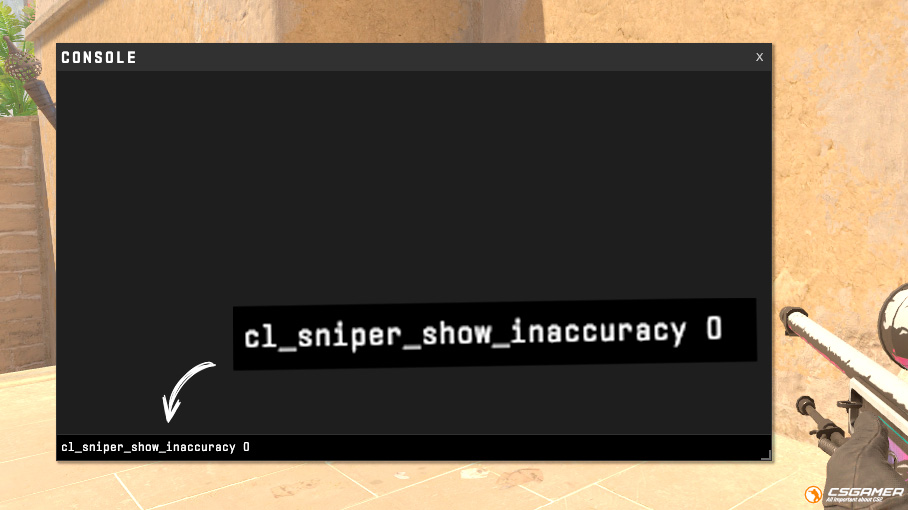
Method 1: Via Console (The Fastest)
This method is for those who want to do everything quickly, in two clicks.
- Launch CS2 and open the console (the ` key or ~ tilde).
- If the console does not open, first enable it in the game settings: “Settings” → “Game” → “Enable Developer Console” → select “Yes“.
- Enter the following command and press Enter:
cl_sniper_show_inaccuracy 0
- Done! The new dynamic circle will disappear, and you will be using the old, trusted scope again.
What does this command do? The parameter cl_sniper_show_inaccuracy 1 enables the display of inaccuracy (the new scope). The value 0 disables it, returning the classic version.

Method 2: Via the Settings Menu (Visual and Simple)
Perfect for players who prefer not to use the console.
- Go to “Settings” → “Game“.
- In the left column, find the “Sniper Sights” section.
- Find the option “Show Scoped Sniper Rifle Inaccuracy“.
- Click on the dropdown menu on the right and select “No“.
After this, the setting will be applied automatically. Close the menu and check the scope in the game.
What to Do If You Want to Try the New Scope Again?
Valve added this option for a reason. The dynamic scope can be useful for beginners to understand when the rifle is most accurate. If you decide to re-enable it:
- Via Console: Enter the command
cl_sniper_show_inaccuracy 1 - Via Settings: Set the value to “Yes” for the “Show Scoped Sniper Rifle Inaccuracy” parameter.
The flexibility of CS2 settings allows you to experiment and find the option that suits you best.
Conclusion
The October 1 update once again confirmed that CS2 is a game that listens to its community. Even when introducing controversial changes, such as the new scope for the AWP and other sniper rifles, the developers immediately provided players with tools for fine-tuning to their preference.
Now you can not only choose between the old and new scope options but also fully customize it to fit your playstyle. If you want to go further in customizing it, we recommend our detailed guides: How to Change the AWP Scope Thickness in CS2, to make it more visible, or How to Make a No-Scope Crosshair for the AWP in CS2, for accurate hip-fire shots.
The flexibility of settings is the key to a comfortable gaming experience. Experiment, find your perfect crosshair, and conquer new heights in CS2.

We have prepared a large list of websites where you can get bonuses such as free cases, skins, or promo codes when topping up.

We compared the price of one skin on various trading platforms to help you choose the most suitable one.

We analyzed case opening sites and compiled a ranking, evaluating them from best to worst based on the quality and profitability of skin drops.